
Run Claude Code in parallel, one worktree each
One coding agent on a repo is a pair programmer. Three at once is a team, and a team needs more than one desk. This is how to give each agent its own checkout with git worktrees, what that still leaves you doing by hand, and how kelpie does the rest - from a branch to a pull request, with your own test in the middle. It applies the same to Codex, Cursor and OpenCode.
Why one checkout is not enough
Section titled “Why one checkout is not enough”Two agents in one working tree share every file. Each one reads the other’s half-finished edits
as the state of the code, a test run picks up changes neither of them meant to test, and a
git checkout by one moves the branch under the other. If the project has a dev server, they
fight over its port too, so the page you open is whichever started last.
Cloning the repo again works, but every clone has its own objects and its own remote config, and a branch made in one is invisible in the others. A git worktree is the lighter answer: a second working directory for the same repository, sharing its history and branches, with a branch of its own checked out.
Worktrees by hand
Section titled “Worktrees by hand”Cut each worktree from a freshly fetched main rather than from whatever your main checkout happens to be on, so the branch starts where its pull request will land:
git fetch origingit worktree add ~/parallel/shop-saved-cards -b saved-cards --no-track origin/maincd ~/parallel/shop-saved-cardspnpm installclaudeRepeat for the next task in another directory, and start the next agent there. A few things to know:
- A branch lives in one worktree at a time. Git refuses to check out a branch another worktree already has, which is what keeps two agents off one branch.
- Untracked files do not come along.
node_modules,.envand build output are per worktree, so each one needs its install, and its secrets copied or linked. --no-trackkeeps the new branch from trackingorigin/main, so a latergit pushcreates its own branch on the remote rather than refusing.- Each dev server needs its own port. Two worktrees both running
pnpm devon 3000 will not both start.
When the work has merged, take the worktree away and, if you like, the branch:
git worktree listgit worktree remove ~/parallel/shop-saved-cardsgit branch -d saved-cardsgit worktree remove refuses a worktree with uncommitted changes, which is the safety you want.
Do not reach for --force unless you have looked.
What still hurts
Section titled “What still hurts”Worktrees solve the files. Everything around them is still yours to keep in your head:
- Which agent is waiting on you. Three terminals, each possibly sitting on a question or a permission prompt, and no way to tell without looking at each.
- Which port is which branch. The dev server on 5174 is serving something; you hope it is the branch you are about to approve.
- Testing before the pull request. An agent that opens a PR the moment its tests pass skips the step where a person uses the thing.
- Cleanup. A worktree removed while its dev server, its terminal and the database it created are still running leaves all three behind.
A feature in kelpie
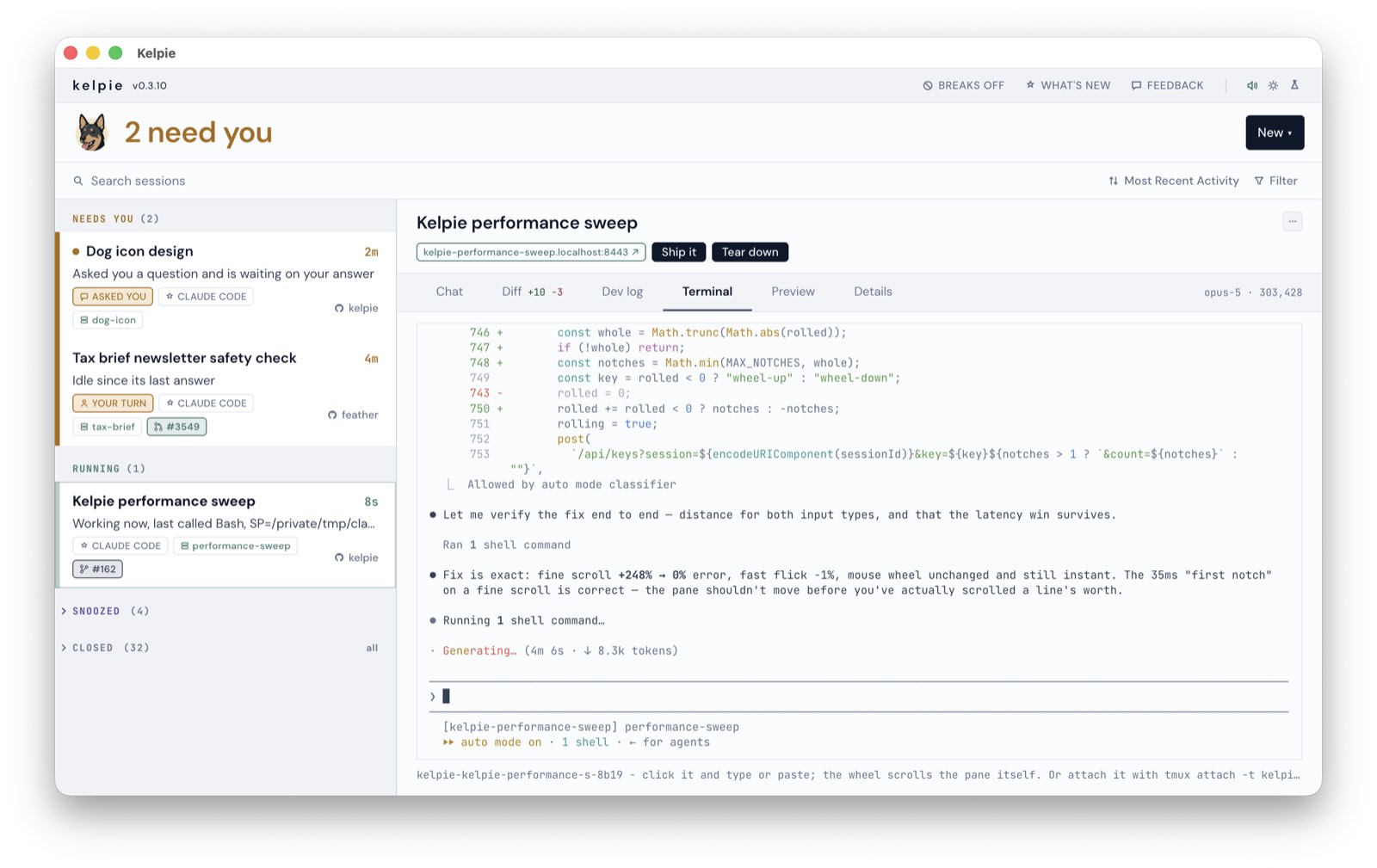
Section titled “A feature in kelpie”New › Feature does the worktree routine above in one step, and keeps the feature on the board as a row until it ships.
1. Name it and say what you want
Section titled “1. Name it and say what you want”Pick the repo and the agent, give the feature a name and write the ask, the way you would brief
anyone. The name becomes the branch, so Saved cards is saved-cards; if that branch exists
already, the new one is saved-cards-2.
2. Kelpie cuts the branch and the worktree
Section titled “2. Kelpie cuts the branch and the worktree”It fetches the branch a pull request would target and cuts the new branch from it, in a worktree
under ~/parallel/<repo>-<name>. Your main checkout never moves. worktreeDir in the
settings picks a different parent directory.
3. It starts the dev server on ports of its own
Section titled “3. It starts the dev server on ports of its own”If the repo has a kelpie.json, each app it declares starts in
its own tmux window on a free port, after the install runs once. With
Caddy installed, the feature also gets an https address of its own,
like https://shop-saved-cards.localhost, so the link on the row always serves that branch and
nothing else.
4. The agent works, then stops for you
Section titled “4. The agent works, then stops for you”The session starts with your ask plus a short brief: it is on its own branch in its own worktree, the dev server is already running and it should use that one, it should try what it is about to ask you to test against the running app, and it must not push or open a pull request until you say how the test went. The row sits under Running while it works, and moves to Needs you when it is done or has a question.
5. You test the running branch
Section titled “5. You test the running branch”The Preview tab is the feature’s app inside the board. Draw a box around anything wrong and add a comment, and the session gets your note with a screenshot of the box. Diff is the branch against its base, split into code, tests and docs, with line comments that go back to the session. Server holds the dev log, Restart and Stop. If you share the board with your phone, the feature’s app opens there too.
6. Ship it
Section titled “6. Ship it”When you are happy, Ship it in the Diff tab tells the session the test passed: commit what is outstanding, push the branch and open the pull request, with the description written the way your repo’s template asks. The PR then shows on the row with its checks and unresolved review threads.
7. Tear down
Section titled “7. Tear down”Tear down, in the session’s menu, is the way out once the PR has merged or the idea is dead.
It stops every session parked in the worktree, the dev server included, runs the repo’s own
teardown command, and removes the worktree. The branch stays, because a pull request may still
point at it. A worktree with uncommitted work is refused, with the reason, rather than forced.
From the terminal
Section titled “From the terminal”The kelpie command drives the board already running, so a script, or an agent, can start and
stop features too:
kelpie feature saved-cards --cwd ~/repos/shop --ask "Let a returning customer pay with a saved card"kelpie restart-dev # the dev server of the feature checked out herekelpie teardown # the feature checked out here: sessions, dev server, worktree--agent picks the agent, and --ask-file reads a longer brief from a file, or from stdin with
-. Every flag is in the CLI reference.
Questions
Section titled “Questions”Can two Claude Code sessions work in the same checkout?
Section titled “Can two Claude Code sessions work in the same checkout?”Not safely. They share one working tree, so each sees the other’s half-finished edits, a branch switch moves both, and their dev servers fight over one port. Give each session its own worktree.
Does kelpie need a config file in my repo?
Section titled “Does kelpie need a config file in my repo?”No. Without kelpie.json a feature still gets its own branch, worktree and session. The file
adds the dev server.
Which agents can it start a feature with?
Section titled “Which agents can it start a feature with?”Claude Code, Codex, Cursor’s agent CLI and OpenCode. Pick one at the top of the New menu.
What happens to the branch on tear down?
Section titled “What happens to the branch on tear down?”It is kept. Tear down removes the worktree and stops what ran in it, but deleting a branch a pull request may point at is left to you.
Does kelpie send my code anywhere?
Section titled “Does kelpie send my code anywhere?”No. It runs on your Mac, reads what the agents already write to disk, and makes no model calls of its own. See What kelpie sends.