 Kelpie
An attention board for coding agents
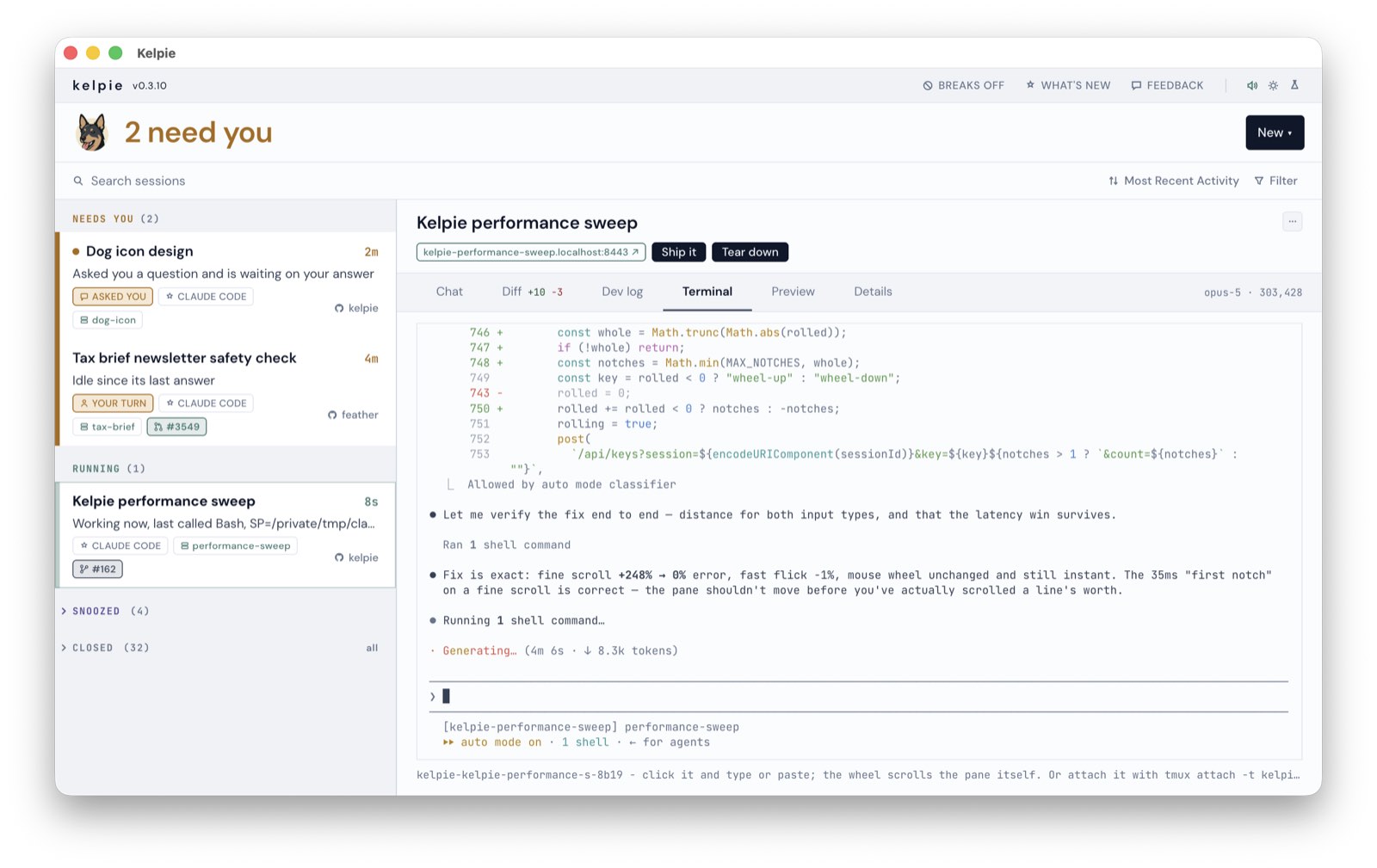
Every agent waiting on you.
Claude Code, Codex, Cursor and OpenCode, in one list, with the ones that need an answer at the top - kelpie reads what they already write to disk, so there is nothing to set up.
Click a row and answer it here, or from your phone. Start a feature, and kelpie takes it from a branch to a pull request with your test in the middle.
2 need you
Needs you (2)
Asked you a question and is waiting on your answer
Idle since its last answer
Running (2)
Swapped the greys for theme tokens, checking contrast next.
Batching the writes per segment, then the benchmark again.
› Snoozed (4)
› Closed (32)
What is on the board
Every row, whichever agent wrote it.
- the New menu One click starts a session in a repo you already work in: a chat, a whole feature on its own branch, or a review of someone's pull request. Pick the agent at the top; kelpie finds the repos, and their worktrees, itself.
- needs you Asked you a question, waiting on a permission, stalled, or gone quiet - each said in words, with a dot on anything that started waiting since you last looked.
- chips The feature's branch, its ticket, published artifacts, and the pull request - whose colour is its build while it is open: checks green or red, unresolved threads in brackets, a tick when GitHub says it is ready.
- running What the agent last told you, and how long it has been at it since your last message.
- snoozed & closed Snooze one and it waits its turn. Closed folds to the last seven days and is still reachable: say something to one and it comes back, or fork it.
- phone Share the board with your phone over Tailscale, feature dev servers included. Scan a code once; nothing is opened to the internet.
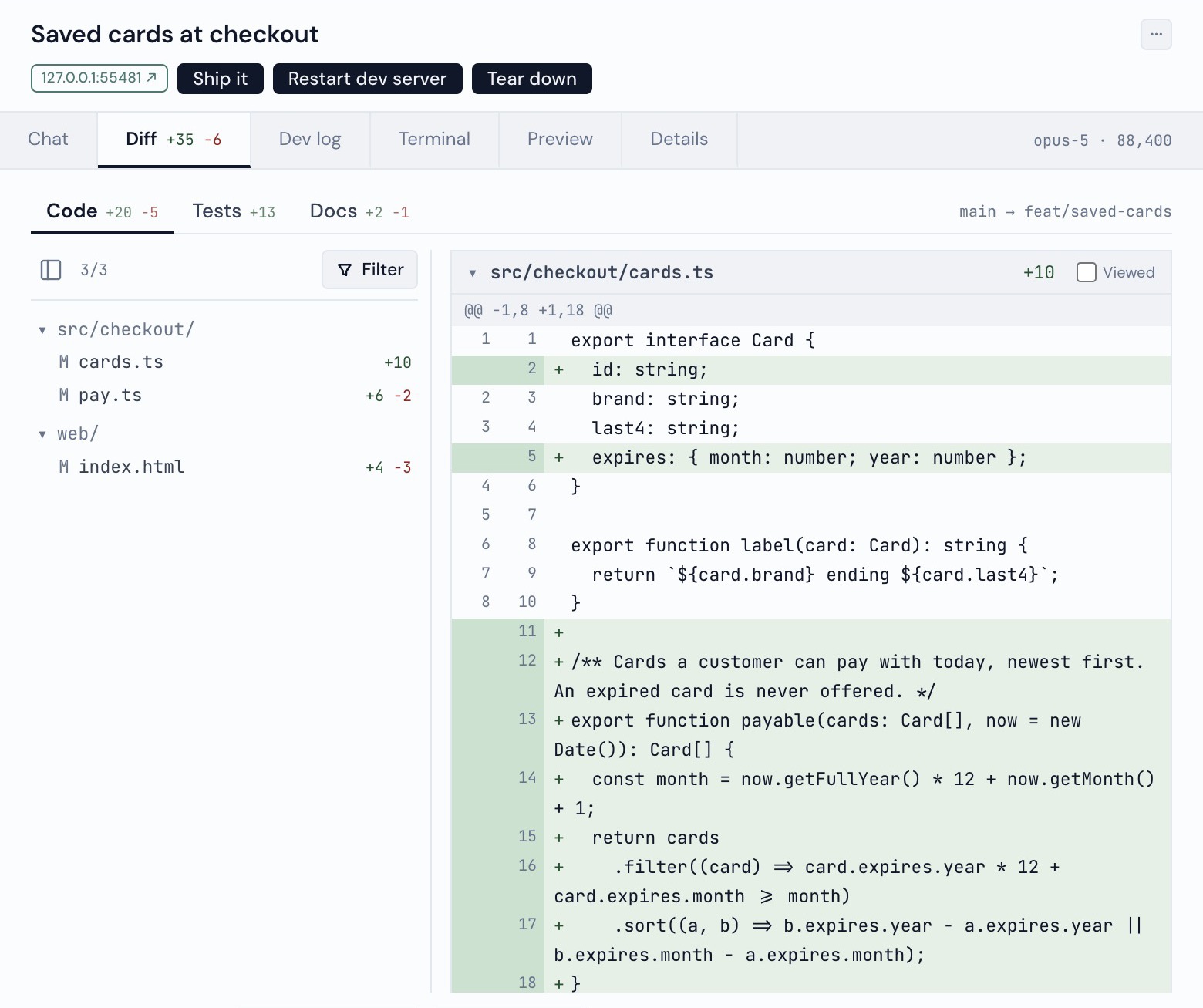
- dev server A feature's apps run on their own free ports, and the chip is the link. Ship it opens the pull request; Restart dev server brings it back; Tear down stops everything parked in the worktree, and is recoverable.
- tabs Chat, Diff, Dev log, Terminal, Preview and Details. Drag a tab to reorder it, or onto a pane's edge to split it - Chat beside Diff.
Then answer it where you are
Chat takes your reply, the question's own buttons, a pasted image or any file, or dictation, and stops a session mid-turn. Terminal is the real tmux pane in your theme. Preview is the feature's running app inside the board, with kelpie's toolbar on the page for drawing a box around what is wrong. Diff is the branch against its base, split into code, tests and docs, with line comments that go back as one review:
New feature is just another row
One button cuts the branch and the worktree from a freshly fetched base, picks free ports, and runs each of your apps in its own window - on a local https domain when Caddy is installed.
Then it waits. You open the URL, use the thing, draw a box on anything wrong - the session building that worktree gets your note with a screenshot of the box - and only then press Ship it.
Tear down stops every session parked in the worktree, runs your teardown, and puts it back. It is recoverable.
Review is the same thing pointed at someone else's pull request: its branch in a worktree, its dev server up, and a session that explains the change. Your line comments in the Diff tab post to GitHub as one review.
{
  "setup": "pnpm install",
  "apps": [
    { "name": "api",
      "command": "pnpm api --port {port}" },
    { "name": "web",
      "command": "pnpm dev --port {port}",
      "proxy": true }
  ],
  "ready": "/health",
  "teardown": "pnpm db:drop"
}
proxy picks the app the URL opens; ready is where kelpie knocks before promising a link; apps find each other through KELPIE_PORT_API. teardown runs in the worktree just before it is removed, for state kelpie cannot see - a database your dev server made, a volume, a registration. setup and teardown are both optional.
Your work never leaves your machine
Checking for updates is the only call it makes to us, and it carries the version and a random install id - nothing about your sessions, your repos or your code. No account, no sign-in, no model calls of its own.
It never writes to the files your agents keep. Its own state is one small cache it owns, and it is built on git, tmux and the CLIs you already run - gh among them, which asks GitHub about your pull requests exactly as it does in your terminal.
Sharing with your phone is off until you turn it on, and goes over your own Tailscale network, never the open internet.
Also in the box
- A Mac app: menu-bar count, Dock badge, notifications you can answer
- Search through every conversation on disk, best match first
- Filters for sessions with a PR or a running dev server
- Light and dark, pinned or following the system
- A break nudge off your desktop's own idle counter
- Setup checks that name the command that fixes them
Who made it
Two engineers at Feather, who needed it first.
We build Feather, an AI tax assistant for accountants and tax attorneys. Almost all of it ships through coding agents now, and a fair share of our week goes into getting more out of them: more work in flight, less of the day spent checking on it.
Kelpie came out of that. We wrote it for our own desks and open it every morning, and it got good enough that it seemed worth handing over. It takes about a minute to set up, and the feedback button in the app files an issue we read.